How to Apply the Framework in Practice
How to Apply the Framework in Practice
(Design method, review method, and maturity model)
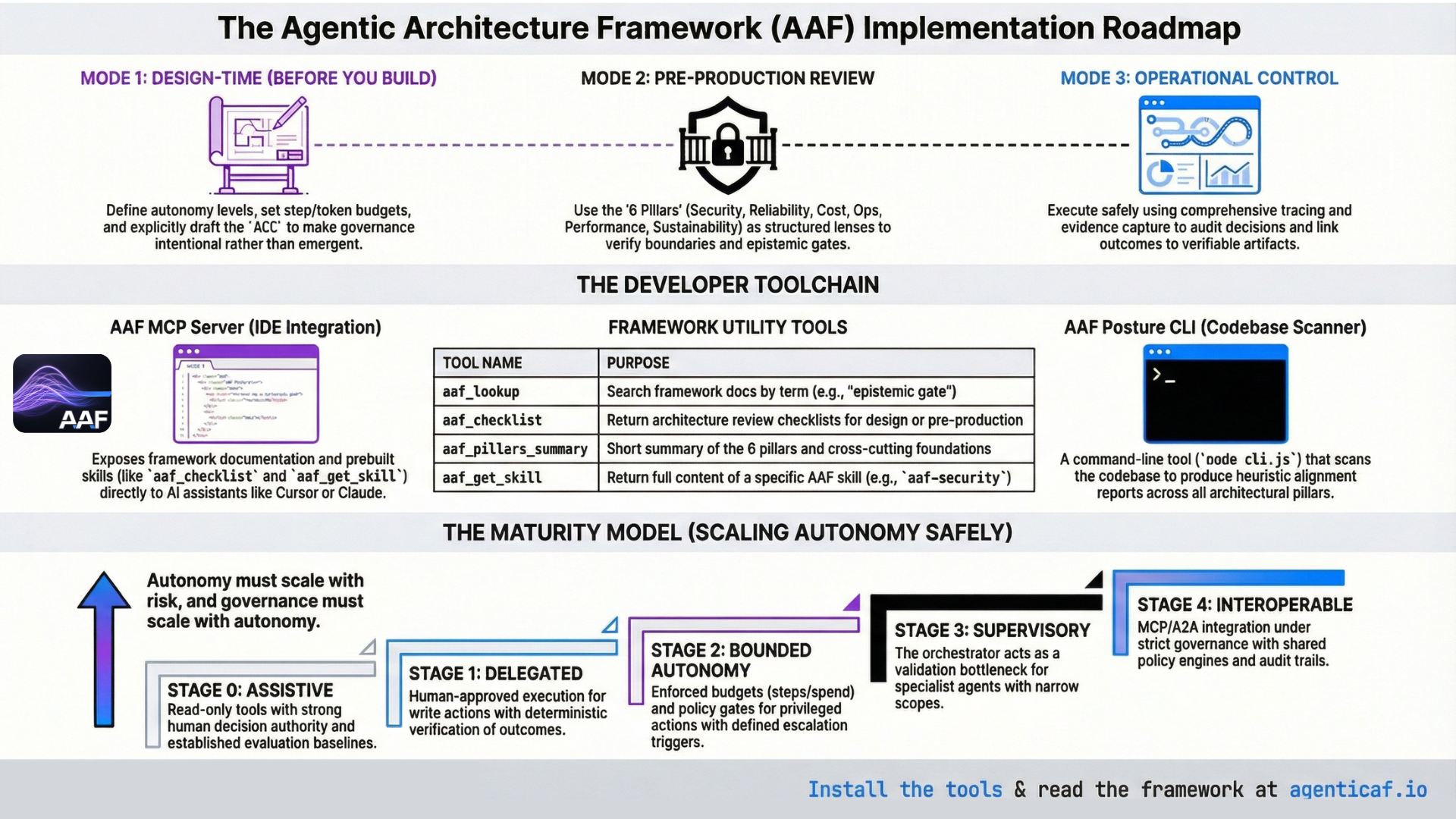
A framework is only valuable if it changes engineering outcomes. This section translates the Agentic Architecture Framework into a practical operating model for teams building and deploying agentic systems.
Usage patterns we expect
The framework is applied in three main ways, aligned with the modes below (design, review, operational control):
- Design teams use it at design time to make governance explicit before implementation: autonomy level, epistemic gates, tool permissions, budgets, context policy, and escalation (Mode 1).
- Reviewers and gatekeepers use it before deployment as structured review lenses across the six pillars and cross-cutting foundations, to identify missing boundaries, verification, budgets, and observability (Mode 2).
- Operators use tracing, evidence, and continuous evaluation to run agents safely, and follow the maturity model to scale autonomy only as verification, tooling, and observability improve (Modes 3 and 4).
In practice, teams can access the framework in three ways: (1) reading and applying the whitepaper and docs directly; (2) using the AAF MCP server so AI assistants (e.g. Cursor, Google Antigravity, Claude) can look up terms, run checklists, and load skills on demand; and (3) running the AAF Posture CLI to produce a codebase-level alignment report. The next two subsections describe the MCP server and the Posture tool.
Accessing the framework: MCP server and skills
The AAF MCP server exposes framework content and prebuilt skills so that MCP-capable clients can apply the framework during design or review without leaving the IDE.
Setup (hosted HTTP — Cursor and similar)
Many clients accept a remote URL: https://www.agenticaf.io/api/mcp (Streamable HTTP). See the Tools page on agenticaf.io for the exact JSON snippet.
Setup (Google Antigravity IDE and other stdio-only clients)
Antigravity uses mcp_config.json with command + args, not a bare URL. Use the mcp-remote bridge (requires Node.js on the machine):
{
  "mcpServers": {
    "aaf": {
      "command": "npx",
      "args": ["-y", "mcp-remote", "https://www.agenticaf.io/api/mcp", "--transport", "http-first"]
    }
  }
}
Add this via Manage MCP Servers → View raw config. If MCP_API_KEY is enabled on the deployment, pass Authorization: Bearer <key> via --header and env (see api/README.md in the repo).
Tools (four)
| Tool | Purpose |
|---|---|
| aaf_lookup | Search the framework docs by term or topic (e.g. “epistemic gate”, “tool gateway”). Returns matching doc names and an excerpt. |
| aaf_checklist | Return the AAF architecture review checklist. Optional kind: "review" (pre-production) or "design" (design-time). |
| aaf_pillars_summary | Short summary of the six pillars and the two cross-cutting foundations (context optimization, autonomy & outcome governance). |
| aaf_get_skill | Return the full content of an AAF skill by id. Use for deep dives on a specific topic. |
Skills available via aaf_get_skill
| Skill id | Purpose |
|---|---|
| aaf-architecture-review | Apply AAF when designing or reviewing agentic systems; pillar checklist, design vs review modes, trade-offs. |
| aaf-security | Security pillar: boundaries, tool actuation, epistemic gatekeeping, supply chain. |
| aaf-epistemic-gates | When and where to place epistemic gates; candidate → validated → authority; gates scale with risk. |
| aaf-cost-context | Cost pillar and context optimization; budgets, model routing, context discipline. |
| aaf-cross-cutting | The two cross-cutting foundations: context optimization and autonomy & outcome governance. |
| aaf-acc-implementation | Implement Agent Control Contracts (ACC): template, placement in architecture, how ACC differs from AGENTS.md. |
| aaf-orchestration-occ | Orchestrator Capability Contract (OCC); governance above orchestration; gateway-only tool invocation. |
Typical MCP workflow
Use aaf_lookup for quick concept checks; aaf_checklist for a structured design or pre-production review pass; aaf_get_skill when you need full guidance (e.g. aaf-security for tool gateway design, aaf-acc-implementation for ACC placement). Hosted endpoint and Antigravity setup: see api/README.md in the repo.
AAF Posture Review and Reporting tool
The AAF Posture CLI scans a codebase and produces an AAF posture report: an assessment of alignment with the six pillars and the two cross-cutting foundations (context optimization, autonomy & outcome governance). It helps teams see gaps before or during an architecture review and track posture over time.
Where it lives
tools/aaf-posture/ in this repo. See tools/aaf-posture/README.md.
How to run
From the repo root, install once then run the CLI:
cd tools/aaf-posture && npm install
node cli.js <path>              # Markdown to stdout (path = directory to scan, e.g. . for current dir)
node cli.js <path> --format json
node cli.js <path> --format html              # Writes aaf-posture-report.html in current directory
node cli.js <path> --format html --output ./reports/posture.html
You can also use npx -C tools/aaf-posture . <path> from the repo root.
What it does
The CLI walks the target directory (respecting common ignore patterns), runs heuristic checks per pillar (e.g. auth patterns, config, file names, keywords), and outputs a report. Findings are indicative, not definitive—the tool looks for signals; manual review is still required for production readiness. Output formats:
- Markdown (default): section per pillar with checklist-style items and status (found / not found / unclear).
- JSON: machine-readable for CI or dashboards.
- HTML: AAF-branded, self-contained report (single file) with all eight pillars and status badges; suitable for sharing or printing.
When to use it
Use the Posture tool before or during an architecture review to get a gap view; in CI to track alignment over time; or to generate an HTML report for stakeholders. Run the docs sync first if the framework docs have changed: from repo root, npm run sync:from-docs, then run the CLI (see tools/README.md).
14.1 Mode 1: Design-Time Architecture (Before You Build)
At design time, the objective is to make the system’s governance explicit before implementation choices calcify.
A design spec should answer, at minimum:
Autonomy declaration
-
What autonomy level is granted (assistive, delegated, bounded autonomous, supervisory)?
-
What tasks are permitted at each autonomy level?
Authority model (epistemic gates)
-
Where are the gates between generation → validation → authority?
-
Which gates are deterministic checks, which require human approval, and which are policy-engine enforced?
Outcome specification
-
What is the Definition of Done for each task class?
-
What evidence must be collected to validate completion?
Tool governance
-
Which tools exist?
-
Which tools are read vs write vs irreversible?
-
What are the permission scopes (least privilege)?
-
What verification checks are required after each tool call?
Budgets
-
What are the step/tool/token/time/spend budgets?
-
What happens on budget exhaustion (escalation, defer, degrade mode)?
Context policy
-
How is context constructed and bounded?
-
How is memory separated from task context?
-
How is provenance tagged (trusted policy vs untrusted data)?
Failure and escalation
-
What are the explicit escalation triggers (uncertainty, inability to verify, high-risk action, suspected injection, tool failures)?
-
What are the degraded modes (read-only, observe-only, human-required)?
14.1.1 Agent control contracts
A useful artifact we have referred to throughout is an “Agent Control Contract” per workflow: a declaration of autonomy, tool permissions, budgets, verification gates, escalation triggers, and logging requirements. This converts “agent behavior” from emergent to intentional.
There is an in depth explanation of ACCs and their role within the anatomy of an agent at Annex A.
An example of an ACC template :
Agent Control Contract (template)
Workflow name:
Autonomy level:
Allowed tools + scopes:
Write actions requiring approval:
Budgets: (steps/tools/tokens/time/spend)
Definition of Done:
Validation checks + evidence required:
Escalation triggers:
Logging / trace requirements:
Rollback / recovery plan:
See annex for further detail on this concept.
14.2 Mode 2: Architecture Reviews (Pre-Production Readiness)
Before deployment, apply the pillars as structured review lenses.
Security Architecture
-
Are all entry points authenticated and authorized?
-
Are tool scopes least privilege?
-
Are write actions gated and verified?
-
Are untrusted inputs (including retrieved content) treated as hostile?
Reliability
-
Is success defined as a verifiable end state?
-
Are tool failures expected and handled?
-
Are actions idempotent or checkpointed?
-
Are retries safe?
Cost Optimization
-
Are budgets enforced at runtime?
-
Is model routing explicit by phase and risk?
-
Is context budgeted (no uncontrolled prompt accumulation)?
-
Are caching and early stopping designed in?
Operational Excellence
-
Is the full control loop observable (Trigger → Decide → Act → Verify), with observability traces (intent → plan → act → verify) captured?
-
Is there an evaluation harness and regression suite?
-
Is rollout staged with rollback?
-
Are skills/tools versioned and reviewed?
Performance Efficiency
-
Is topology justified by task structure (single-agent by default; orchestration only where it helps)?
-
Are tool round trips minimized?
-
Is work partitioned into interactive vs batch?
Sustainability
-
Is usage measured and visible?
-
Are efficiency levers used as defaults (minimal context, concise outputs, cached prefixes, bounded loops)?
In practice, the absence of budgets, verification, and observability is the most reliable indicator that an agent system is not production-ready.
14.3 Mode 3: Operational Control: Tracing, Evidence, and Continuous Evaluation
To operate agents safely, teams need a consistent record of what happened during a run: model calls, tool calls, handoffs, guardrails, and custom events.
OpenAI’s Agents SDK describes built-in tracing as collecting a comprehensive record of events during an agent run—including LLM generations, tool calls, handoffs, guardrails, and custom events—and frames tracing as a way to debug, visualize, and monitor workflows in development and production.
Architecturally, tracing is not an observability “nice to have.” It is how you make the agentic control loop governable:
-
you can audit what influenced a decision,
-
you can reproduce failure contexts,
-
you can measure budget consumption, and
-
you can link outcomes to evidence artifacts.
14.4 A Practical Maturity Model for Scaling Autonomy Safely
Most organisations should treat autonomy as a staged maturity journey:
Stage 0 — Assistive
-
read-only tools
-
strong human decision authority
-
strong logging and evaluation baselines
Stage 1 — Delegated (human-approved execution)
-
preview/approve gates for write actions
-
deterministic verification of outcomes
-
scoped tool permissions
Stage 2 — Bounded autonomy
-
enforced budgets (steps/tools/tokens/time/spend)
-
policy gates for privileged actions
-
defined escalation triggers and degraded modes
-
canary releases and rollback discipline
Stage 3 — Supervisory orchestration
-
orchestrator as validation bottleneck
-
specialist agents with narrow scopes
-
cross-agent budgets and identity constraints
-
explicit inter-agent provenance controls
Stage 4 — Interoperable ecosystems
-
MCP/A2A integration under strict governance
-
shared policy engines, shared audit trails
-
cross-domain budgets and outcome verification
This maturity model reflects the paper’s central stance: autonomy must scale with risk, and governance must scale with autonomy.
Section 14 Citations
- OpenAI Agents SDK tracing (what traces include; production monitoring intent).